Tool Descriptions Are Manuals Written for the Model
The AI-FDE Transition Path · AI Engineering 06 — Tool Calling
1. When Does a Large Model Need Tools?
My judgment: a model alone can't answer enterprise questions well. It's not that it isn't smart enough—it's that it inherently lacks three things: it doesn't know your data, it can't calculate accurately, and it can't take action.
An analogy. Think of the model as a consultant who has read a lot of books, invited into a room with no phone, no calculator, and no hands. Ask "how should this policy be understood," and he explains it fluently; change the question—"is this supplementary regulation still in effect," "did last month's expense exceed the budget," "change this application to accepted and notify the applicant"—and he can only guess. For the first two he'll give you a very plausible date and number; for the third he doesn't even know which button to press.
These three gaps need to be looked at separately, because the fixes are completely different (the following clients and projects are fictional examples, used only to illustrate the method):
| Gap | Symptom | Example (Hengxin Bank policy Q&A) | What fixes it |
|---|---|---|---|
| Doesn't know | Things after the training cutoff, intranet data, the current state | Which version of this 2025 supplementary notice is currently in effect | Retrieval tools: query the knowledge base, query internal APIs, web search |
| Can't calculate accurately | Date differences, expense totals, percentages, rankings | How many days apart two reimbursements are, whether this one exceeds 5% | Calculation tools: code execution, calculator, statistics APIs |
| Can't act | After looking it up, something still needs to be changed | Change this application to "accepted" and notify the applicant | Action tools: write APIs, send messages, initiate approvals |
A habit I've built up on projects: run requirements through this table first, then talk about whether to build. Of the ten "AI can't do this" scenarios a client brings up in one breath, four or five often aren't cases of the model failing—it's that nobody gave it tools. Those don't need a different model or prompt tuning; connect an API and they work. Only the remaining few really require changing the process or making trade-offs. Fail to tell these two groups apart, and you'll turn simple problems into big projects.
One more thing to be clear about: tools don't upgrade the model's intelligence—they give it eyes and hands. Once connected, the model is still the same model, and it still hallucinates where it hallucinates. The difference is that it now has somewhere to look things up and a way to actually get things done. That distinction matters: plenty of solutions fail because they treat tools as a panacea, expecting them to cure hallucination along the way—they can't. That's a matter for the other three chapters.
2. The Tools at the FDE's Disposal
Don't categorize by technical implementation (HTTP vs. gRPC, REST vs. GraphQL—that's the developers' concern). Categorize by what the tool does for the model. The benefit of this split: in a requirements meeting, you can go straight down the customer's feature list and mark it—this item needs category X, that category is missing.
| Category | What it does | Typical examples | When to use | Most common pitfall |
|---|---|---|---|---|
| Fetch information | Pull external data in for the model to read | Web search, knowledge base retrieval, policy lookup APIs, ticket status lookup | The answer depends on facts the model doesn't know | Dumping a huge raw response payload into the model and blowing up the context—one more line on the bill from Lecture 03 |
| Do computation | Let code compute, not the model | Calculators, code execution, date differences, amount totals, sorting and filtering | Results must be exact; dates and amounts can't be fuzzy | Treating a computation as something the model should do in its head, and not even noticing when it's wrong |
| Take action | Actually change something | Update ticket status, send notifications, initiate approvals, write to the database | The user wants it "done," not "known" | No confirmation step—one sentence from the model and production data is modified |
| Connect to legacy systems | Wrap existing systems into something AI can use | Wrapping internal APIs, importing OpenAPI/Swagger, MCP servers | The capability already exists, the model just can't use it | One tool does one tiny thing; dozens of tools laid out in front of the model and it can't pick |
The fourth category is the most underrated. In a bank, the vast majority of "capabilities AI needs to use" have long been sitting in some system—unified authentication, approval workflows, customer info lookup, credit limit validation. The code you actually write new is very little; what you do is translate existing APIs into a form the model can understand and call correctly. People with an implementation background actually have an advantage here: you know where that API is, who can approve permissions for it, and which version of the response is good enough.
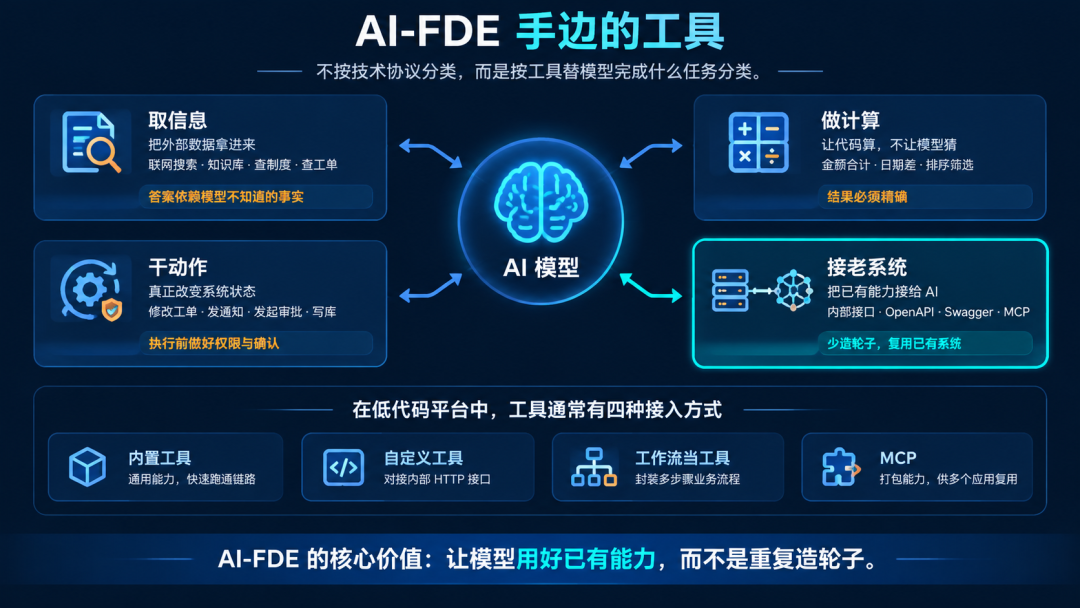
On a low-code platform (represented by Dify and similar—example platforms, choose per the customer's environment), wiring up tools basically comes down to four paths:
Platform built-in tools: General capabilities like web search (requires a search backend), code execution, and getting the current time. Check a box and they work—good for getting the pipeline running end to end before talking about optimization.
Custom tools: Feed in an internal HTTP API. If the other side has OpenAPI/Swagger docs, most platforms can import and generate directly; what's left is writing a clear description—which is what the second half of this chapter covers.
Workflows as tools: Wrap a chain of steps (look up, then judge, then look up again) into a single tool for the layer above to call. This is our most-used approach: complexity stays inside, and only a clean exit is exposed outside.
MCP: Package an entire set of capabilities into one service, shared across multiple applications. Lecture 07 covers this specifically.
One red line of my own: at the same decision layer, don't have more than ten tools. Past ten, the number of times the model picks the wrong tool goes up noticeably. At that point, what you should do isn't keep polishing descriptions—it's merge similar tools, or group by scenario and do two-level routing: a coarse classifier picks the scenario first, then you go into that scenario's tool set.
Finally, a high-frequency question: So which category does an Agent fall into? It's not on the list—it's the layer that holds the tools, not a tool in hand. A tool is one call, one result; an Agent runs the "think about the next step" loop and decides for itself what to call and when to stop. The relationship is containment, not parallel: an Agent without tools is just a chatbot that talks a good game but can't get anything done.
| What to look at | Tool | Agent |
|---|---|---|
| How many calls | One call returns one result | Loops on calls, decides the next step itself |
| Who's in charge | The layer above supplies parameters, it complies | Decides which tool to call and when to stop |
| After an error | Reports the error back to the layer above, which decides | May self-correct, or may keep self-confirming all the way to disaster (the incident in Lecture 09) |
There's one situation that makes it feel like an Agent is on the list too: wrapping a dedicated small loop into a tool for the layer above to call (a sub-loop used as a tool). This isn't a contradiction—to the layer calling it, it's a tool; to its own layer, it's a complete loop. There's only one dividing line: does it have the "think about the next step" step? If yes, draw it a stop line per Lecture 09. If no, writing that description well is enough.
3. Connecting Tools Doesn't Mean the Model Knows How to Use Them
By the third month of Hengxin Bank's policy Q&A system, we had hooked three tools into it: look up a policy's effective date, look up a document's scope of application, and look up a clause's revision history. After launch, a problem surfaced: when the system clearly should have looked up the effective date, it insisted on digging through the materials itself, and when it couldn't find anything, it made one up.
At first we assumed the model's reasoning wasn't good enough. Later we pulled up the tool description and saw that the tool's documentation was a single line: "Look up a policy's effective date."
That one line was the problem. Here's an analogy: you're at a hotel front desk asking "any good food nearby?" If the clerk says "there's food," you'll feel he's brushing you off; if he says "there's a little local place five minutes' walk away that locals frequent, usually no wait after 8 p.m., about sixty to seventy per person, but closed on Tuesdays," you can decide on the spot whether to go. The basis for the model deciding "do I call this tool this time" comes entirely from the description you wrote—it won't read your API source code, and it can't see your database table structure.
This description needs to answer four questions:
| Question | Why answer it | What happens if you don't |
|---|---|---|
| When should it be used | The model relies on this to decide "should I call it this time" | It doesn't call when it should, or calls it for every question |
| When should it not be used | Boundaries are more effective than positive descriptions | A customer asks something common-sense, and it goes and looks it up anyway—slow and prone to going off track |
| What the parameters mean | The model has to fill in the parameters correctly itself | Wrong units, date formats, account types |
| What it returns, and how it reports failure | Determines the model's next action | It gets a wrong result and keeps making things up |
Of the four, I value the second most—spelling out the "don't use it" scenarios. It's the one most people miss, and the one that pays off fastest.

4. Bad and Good Versions Side by Side
This is what you should take away from this piece. On the left is the description from our first release; on the right is the revised version (an illustrative rewrite, used only to explain the method):
| Dimension | Bad version | Good version |
|---|---|---|
| Tool name | dateQuery | Query policy effective date |
| One-line description | Query date | Query the effective date and expiration date of a policy document. Call this when the user asks "when did this regulation take effect" or "is it still in force now" |
| When not to use | Not written | Only answers the two dates: effective and expiration; when the user asks about revision history or scope of application, use the other two tools, not this one |
| Parameters | id (no explanation) | doc_id: the internal ID of the policy document, in the form "ZX-07", taken from the retrieval results; do not make the user dictate or guess it |
| Return | Returns result | Success: returns two fields, effective date and expiration date; failure: returns the fixed message "No effective date found for this document"; do not let it guess |
| Failure action | Not written | When nothing is found, explicitly tell the user it was not found; guessing dates from the file name is prohibited |
To be honest, the effect after the revision is not exactly a transformation—this kind of change usually does not produce an "everything is right all at once" plot twist (an illustrative observation, used only to demonstrate the framing: the mis-call rate can drop by a chunk, but the specifics depend on your own project's measurements). The real change is that it became controllable: when the model fails to call a tool it should call, you can revise the description instead of guessing.
5. What Counts as Knowing It
The requirements in your hands fall into three categories: those that can be answered once you give them information, those that must be computed, and those that must actually change something. If you can't tell them apart, it means you're using the model to brute-force work that a tool should be doing.
You can say which category each tool in the project belongs to, and which system the business grew out of. A tool whose origin you can't explain was probably added for a demo in the first place.
You can recite each tool's one-sentence description and say "when it should not be called." If you can't, chances are the model won't call it correctly either.
You have had at least one experience of taking a description, revising it, and verifying the effect after the revision—not "it felt better after the change," but "mis-calls dropped from X to Y" (the record-keeping from Lecture 02 comes in handy here).
Hands-on task: first, following the four categories from Section II, list the tools currently attached to your project and mark which category is missing; then pick the one that gets called most frequently and rewrite its description according to the four questions. Then test it with twenty real questions: how many should have been called but weren't, and how many were called but shouldn't have been. Record both numbers before and after the revision.
6. Pitfalls
Pasting an entire API doc in. API docs are written for humans and contain a lot of information the model doesn't need: author, version history, internal jargon, usage examples. Stuffing it in isn't just useless, it also burns tokens — one more line on the bill from Lecture 03.
Keeping parameter ranges only in your head. What date format is required, what shape the ID takes, which enum values exist — if these aren't written into the description, the model will make one up based on what it has seen. We got burned by this once: the model "guessed" a document ID that didn't exist, the tool returned empty, and it went on to tell the user "that policy has been deprecated" — the client blew up on the spot.
Tools that can modify data without guardrails. The third category, "take action" tools, is the most dangerous kind. My approach: these tools either produce a plan first and wait for a human to click confirm, or they're restricted to certain states and certain scopes, with every call logged. I'll expand on guardrails in Lecture 13.
Changing ten things at once. Changing descriptions follows the same rule from Lecture 02: change one thing, run the regression questions, look at what changed. Rewriting the name, description, boundaries and examples all at once means you've validated nothing.
Next lecture continues on tools, but from a different angle: if your tool sits on top of a whole legacy system, is there a way to write less integration code — wrapping the internal system into a service the AI can use.
"The AI-FDE Transition Path": written for IT implementation / pre-sales / operations people who don't write code, to turn existing delivery skills "AI-native." 55 articles in the series, 53 skills across six modules.
Want to see what you're missing first: AI-FDE Skills Self-Assessment Map, score 53 items, get a radar chart. The AI-FDE Transition Path · Introduction