How a Model Actually Uses a Tool
The AI-FDE Transition Path · AI Engineering 06 — Tool Calling, Under the Hood
This article mainly explains the principles of how large models use tools. Through this document, you will clearly understand the relationship between large models and tools, and better demystify large models. The content is quite extensive, so I recommend bookmarking it and viewing it on a computer.
1. First, let's be clear about one thing: the model does not call tools directly
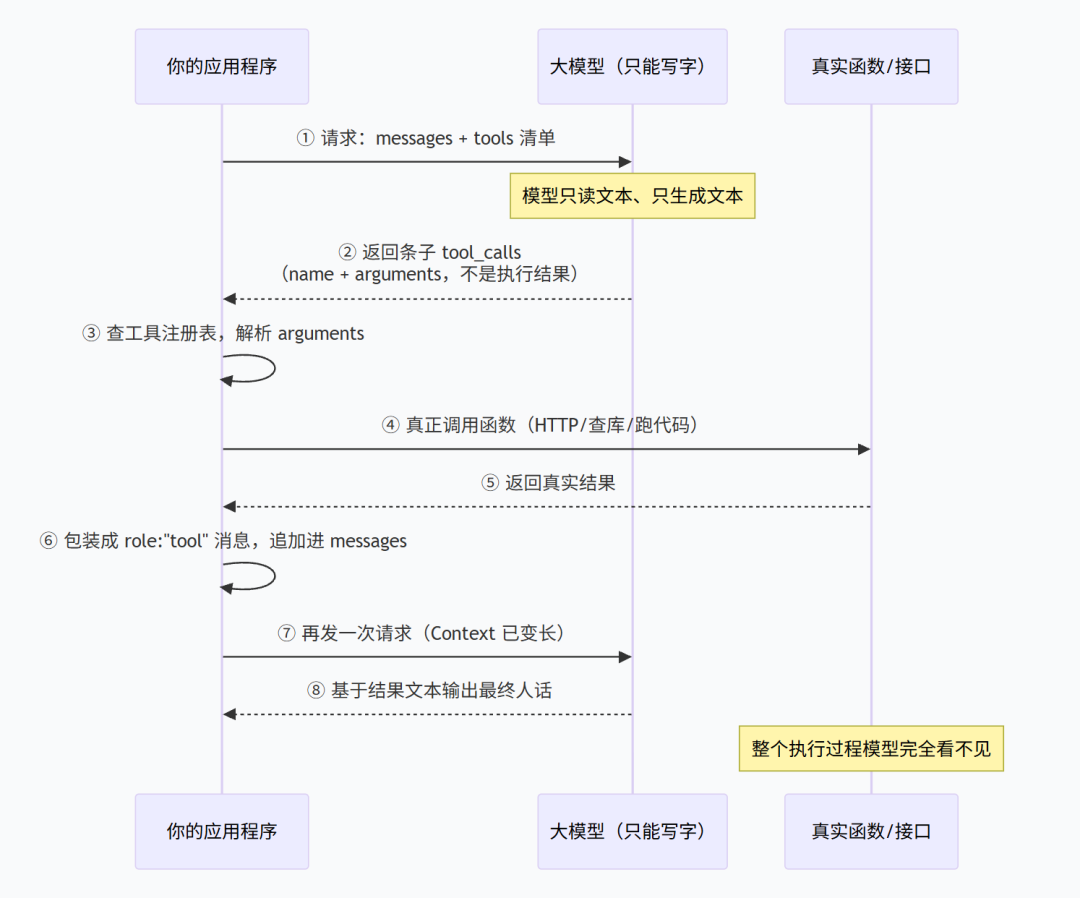
My view is this: the model never calls any tool from start to finish. All it outputs is a piece of text—a piece of text that says "I intend to call a certain tool, and these are the parameters." The thing that actually calls the API, queries the database, and runs the code is your program.
That may sound like splitting hairs, but it determines everything that follows. You think you are "teaching the model to do things," but in fact you are pairing a person who can only write and cannot act (the large model) with an errand runner (the tool).
Here's an analogy. The model is a person who can sit still: give him pen and paper, and he can write, analyze, and produce a report that looks quite professional. But the room has no door, no internet, and no phone—he can't get out. His only way to communicate with the outside world is to write a note on paper and hand it out: "Please help me look up the effective date of ZX-07."
That note is what we call a "tool call." The model's ability is writing the note; the errand-running work is done by your program. The note is used to describe the tool.
| Step | Who does it | Can the model see it? |
|---|---|---|
| Understand what the user is asking | Model | Yes |
| Decide "whether to look it up, which one to look up, what parameters to fill in" | Model | Yes |
| Actually call the API, query the database, run the code | Your program | No |
| Intermediate retries, permission checks, desensitization, rate limiting | Your program | No |
| Organize the result into a piece of text and stuff it back into the conversation | Your program | Yes (only the part that is stuffed back) |
| Write the final answer based on the result | Model | Yes |
A tool call is essentially "the model writes a note → your people run the errand → the errand result is pasted back onto the note → the model reads the note again." The model never touches your system from start to finish; it only processes text.
2. What the Model Sees Each Round Is Called Context
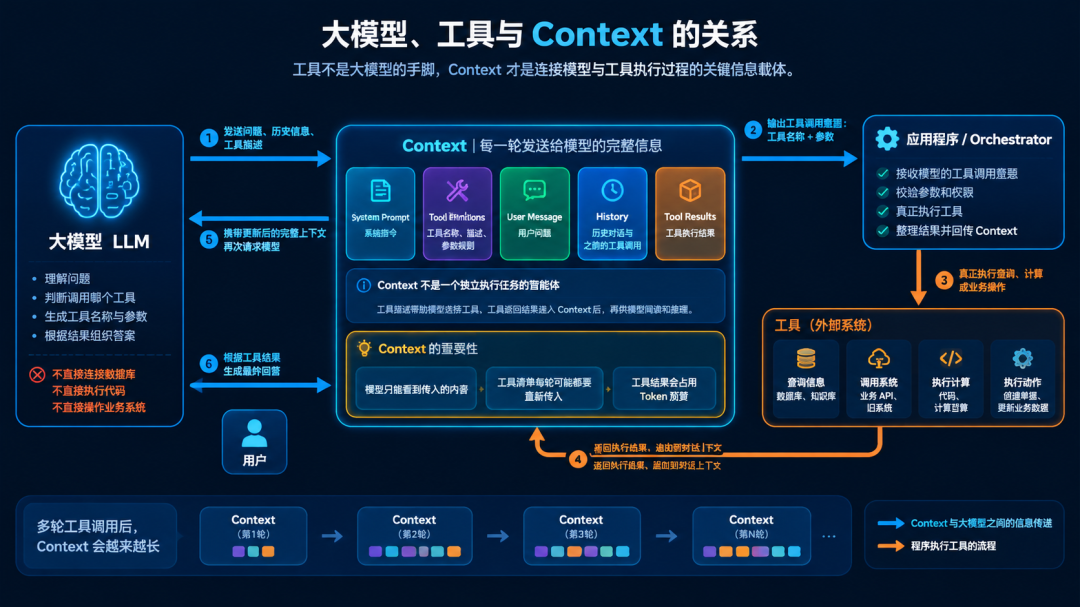
What is the relationship between large models, tools, and Context? Lecture 03 made a statement that I'll put here as the foundation: context. What the model receives each time isn't "how long we've been chatting," but the entire chunk of text pieced together in front of it—system prompt, retrieved materials, conversation history, tool return results—handed to it all at once, and it processes the text.
Now put tools into this picture, and you'll see something previously overlooked: tool calling doesn't happen outside of Context—it grows right on top of Context.
Specifically, three things.
First, the tool list itself is in the request, and it must be resent every round.
In the budget table from Lecture 03, you split it into five segments: system prompt, retrieved materials, conversation history, tool returns, output reserve. The tool list isn't in the table, but its overhead is the same category as "system prompt"—resident, carried every time. Mount five tools, and that's five descriptions passing through every request.
Second, tool return values occupy the "tool returns" slot, and they genuinely squeeze out space for other content.
In that table from Lecture 03, "tool returns" was budgeted at 10%–20%, and if exceeded, it gets cut first. This statement now has concrete meaning: tool return values and retrieved materials compete for the same budget. One call returns three hundred fields, and the model only needs five—then cut it. Also, the more tool calls there are, the more stuff gets filled back into Context, and the "context snowballs" idea from Lecture 03 rolls faster.
Third, and most critical: Context is the model's only memory, so tool returns must speak for themselves.
Lecture 03 covered the large model's memory—it has no automatically continuing chat memory; every round, previous content is reassembled and sent over. Tool results are the same: once they enter Context, they're just a piece of text, and the next time the model reads this text, it doesn't know whether this text is real data, an error message, or fallback copy you wrote yourself.
So the reason "tool returns empty" is dangerous has its root here: empty strings and null entering Context look to the model like "queried, no results," not "query failed." The model making things up from there is faithfully using its context. What isn't in Context, the model will never know.
3. The Complete Five Steps of a Single Tool Call
Breaking that sentence apart gives you five steps. Let's walk through them using the "look up policy effective date" tool.
Step 1: You put the tool list into the request.
It's not the endpoint URL you put in — it's a piece of text for the model to read: what the tool is called, what it does, when to use it, what the parameters are called, what they look like, and what it returns. Mainstream platforms all put this in a separate field of the request body (OpenAI calls it tools, Anthropic also calls it tools), and the tool's parameter shape is described with JSON Schema.
That text is all the model sees. It can't see your API docs, your database table schemas, or the method implementations in your Java code.
Step 2: The model outputs a call intent.
The model decides "this question needs the effective date looked up," so what it outputs isn't a natural-language answer but a piece of structured data meaning "I want to call the query-policy-effective-date tool with parameter doc_id equal to ZX-07."
Field names differ across vendors, but the structure is the same. In OpenAI's Chat Completions it looks like this (illustrative):
tool_calls: [
  {
    id: "call_abc123",
    type: "function",
    function: {
      name: "query_policy_effective_date",
      arguments: "{\"doc_id\": \"ZX-07\"}"
    }
  }
]
Anthropic's format is different, but you can think of it as two dialects of the same thing:
content: [
  {
    type: "tool_use",
    id: "call_abc123",
    name: "query_policy_effective_date",
    input: { "doc_id": "ZX-07" }
  }
]
Two differences are enough to remember: OpenAI's arguments is "a string containing JSON," while Anthropic's input is directly an object. Everything else is just packaging differences. Generally, the OpenAI format is used.
Step 3: Your program executes it.
The program takes the name, finds the corresponding implementation in the "tool registry" it maintains itself, sends the HTTP request, queries the database, runs the code. This step happens entirely in your environment — the model sees none of it.
Step 4: The result goes back into the context.
The program appends the tool's actual return result (or an error message) as a new message to the conversation, then sends another request to the model.
One detail worth remembering here: it's "append," not "replace." The conversation is still that same whole thread, just with another segment tacked onto the end — this is the "snowball" from Lecture 03, growing a bit with each roll.
How each vendor packages it: OpenAI uses a message with role: "tool", matched to the Step 2 call via tool_call_id; Anthropic uses a content block with type: "tool_result", placed in the user message immediately following the assistant turn, with tool_use_id matching the id from the previous step.
Step 5: The model answers based on the result.
This time it can see the answer, because the answer is now sitting in the context as text. Of the five steps above, only this one is "the model outputting words for a human to read."
So you'll notice a counterintuitive fact: a tool call isn't "one" model interaction, it's "one more." The model is called at least twice — the first time to write the slip, the second time to read the result and write the answer. If you query three times in a row within one conversation, that's four model interactions. This maps directly to the accounting from Lecture 03: with each additional round, the entire context has to be retransmitted.
4. Laying Out the Five Steps: A Complete Interaction Message Trace
This section is the part of this article you should read most. What came before was theory; here we look at the real thing.
First, let's be clear about how to read this message trace.
The trace is titled "Round N," where one round = the model being called once. Each round is one question and one answer, with two fixed directions:
Round N:  Your program ──── question (with Context + tool list) ────▶  model
          Your program ◀─── answer (either a call intent, or something for a human to read) ── model
So "your program → model" and "model → your program" are two halves of the same round, not two rounds of a back-and-forth. In round 1 you send a request, and the model returns a note; in round 2 you send the note plus results, and the model returns a note; this continues until some round where the model no longer returns a note but instead returns a piece of human language—that round is the finale.
The whole chain is 4 rounds: the first three rounds are running tools, and only in round 4 does the model actually process things.
Before reading the trace, let's clarify two conventions (all traces below follow them):
| Notation | What it means |
|---|---|
"(same as before, unchanged)" |
The content of this message is exactly the same as the previous round; to save space I won't paste it again. It is still in that request, not a single word missing. |
"... four tools resent verbatim, omitted here for brevity ..." |
The full definitions of the four tools appeared in round 1, and they are resent unchanged every round, not a single word altered. |
I want to emphasize: what's omitted is only the space taken up by pasting here, not the content in the real request. What your program sends out each round is complete.
Four-round overview table (I suggest scanning this table first so you don't get confused in the traces below):
| Round | Who initiates | What happens | What the model returns this round | messages length | What was added to Context |
|---|---|---|---|---|---|
| 1 | Your program | Ask the question + attach tool list | Two call intents (query expense, query policy) | 2 messages | User question |
| 2 | Your program | Fill in the two query results | One call intent (calculate overage) | 5 messages | Model note + two tool results |
| 3 | Your program | Fill in the calculation result | One call intent (submit supplement) | 7 messages | Model note + calculation result |
| 4 | Your program | Fill in the successful submission | A piece of human language (finale) | 9 messages | Model note + ticket number |
Note one thing: "rounds" counts how many times the model was called, not how many tools you wrote. Here 4 tools were called, but the model was only called 4 times, because in round 1 it asked for two tools at once.
Now look at the messages column: 2 → 5 → 7 → 9. Each time a tool is called, Context grows by two messages (the model's note + the tool result), and none of the earlier ones are deleted—the whole thing is resent every round. The snowball from Lecture 03 is exactly these numbers in this table.
One more detail: every round, what you send to the model is a complete JSON request containing all conversation so far (Context). What the model returns each round is only the newly added segment for that round, not the whole thing. That's why the response trace you see is much shorter than the request trace—the model only returns the increment, and the complete history is kept for you by your program, resent unchanged each time.
This point is the antidote to all confusion in this section: the model doesn't know what happened before; it only knows the text you sent this time.
Scenario: Hengxin Bank's internal assistant. The user asks, "That travel expense reimbursement from last week—did it exceed the bank's travel policy? If it did, help me submit a supplement and give me the ticket number."
This one sentence hides four kinds of work, so we attached four tools to the request—exactly the four categories from Lecture 06, Section 2 (fetch information, connect to legacy systems, do calculations, take actions):
| Tool name | Which category from Lecture 06 | What it does |
|---|---|---|
queryExpense |
Fetch information | Query the actual amount of the user's most recent expense report |
queryTravelPolicy |
Connect to legacy systems | Query the bank's travel policy (wraps a layer around the legacy policy query interface) |
calcAmountOver |
Do calculations | Calculate the overage amount and overage ratio |
createExpenseSupplement |
Take actions | Submit an expense supplement and return the ticket number |
[Round 1 · First half] Your program → model
(The "question" half in the diagram above. The JSON below is the entire content you send to the model.)
{
  "model": "DeepSeek-V4-Flash",
  "messages": [
    {
      "role": "system",
      "content": "You are the internal affairs assistant of Hengxin Bank. For any amount involved, always rely on system data; you are not allowed to calculate on your own. For any ticket-submission operation, you must first verify the standard before executing."
    },
    {
      "role": "user",
      "content": "For my travel reimbursement from last week, did it exceed the bank's travel standard? If it did, help me submit a supplementary form and give me the ticket number."
    }
  ],
  "tools": [
    {
      "type": "function",
      "function": {
        "name": "queryExpense",
        "description": "Query the most recent submitted reimbursement form of the current user. Call this when the user asks 'how much was my reimbursement' or 'what is the reimbursement ticket number'. Only queries the most recent one; do not use this tool when querying multiple historical records or other people's reimbursements.",
        "parameters": {
          "type": "object",
          "properties": {
            "user_id": {
              "type": "string",
              "description": "Employee ID, in the form E10238, obtained from the login session; do not ask the user to dictate it"
            },
            "status": {
              "type": "string",
              "enum": ["submitted", "approved", "paid"],
              "description": "Filter by status; defaults to submitted"
            }
          },
          "required": ["user_id"]
        }
      }
    },
    {
      "type": "function",
      "function": {
        "name": "queryTravelPolicy",
        "description": "Query the bank's current travel expense standards, returning the accommodation limit and meal limit corresponding to the job level. Call this when it is necessary to determine whether an expense exceeds the standard. It does not return specific amount calculation results, only the standard itself.",
        "parameters": {
          "type": "object",
          "properties": {
            "job_level": {
              "type": "string",
              "description": "Job level code, in the form P6, P7"
            },
            "city_tier": {
              "type": "string",
              "enum": ["1", "2", "3", "other"],
              "description": "Tier of the business trip city; 1 is first-tier, other is other"
            }
          },
          "required": ["job_level", "city_tier"]
        }
      }
    },
    {
      "type": "function",
      "function": {
        "name": "calcAmountOver",
        "description": "Calculate the amount and ratio by which the actual amount exceeds the standard. Only performs arithmetic and does not query any system. When passing amounts, the unit is always yuan; do not pass ten-thousand yuan or jiao.",
        "parameters": {
          "type": "object",
          "properties": {
            "actual_amount": {
              "type": "number",
              "description": "Actual incurred amount, in yuan"
            },
            "limit_amount": {
              "type": "number",
              "description": "Standard limit, in yuan"
            }
          },
          "required": ["actual_amount", "limit_amount"]
        }
      }
    },
    {
      "type": "function",
      "function": {
        "name": "createExpenseSupplement",
        "description": "Submit a reimbursement supplementary form. Call only after it has been confirmed that the expense indeed exceeds the standard and the excess amount has been obtained. After submission, the ticket number must be returned to the user.",
        "parameters": {
          "type": "object",
          "properties": {
            "expense_id": {
              "type": "string",
              "description": "Original reimbursement ticket number, from the return of queryExpense"
            },
            "over_amount": {
              "type": "number",
              "description": "Excess amount, in yuan, from the return of calcAmountOver"
            },
            "reason": {
              "type": "string",
              "description": "Brief description of the reason for exceeding the standard, no more than 50 characters"
            }
          },
          "required": ["expense_id", "over_amount", "reason"]
        }
      }
    }
  ],
  "tool_choice": "auto",
  "parallel_tool_calls": true
}
Pause for a moment and see what this trace teaches:
Everything the model receives is this JSON. It doesn't know what your expense system looks like, doesn't know which table "job level P6" maps to, doesn't know where
job_levelshould come from—it only knows thatjob_levelis a string, what values are in the enum, and that you told it "in the form P6, P7."The two sentences in
descriptionare not decoration: "call this when the user asks…" is what the model uses to decide whether to call it, and "don't use this tool for multiple historical records or someone else's expenses" is the boundary. These are the first two of the four questions from article 06.enumtells the model "don't make it up": writing "the unit is always yuan, don't pass ten-thousand yuan" indescriptionplugs a specific hole.Among the four tools, the first two are "ask," the third is "calculate," and the fourth is "change." The model can't see this classification; it only reads the text.
[Round 1 · Second half] Model → your program
(The "answer" half. This is the complete trace the model returns this round, not a single field omitted—many tutorials only paste the message block, so you can't see what else is outside:)
{
  "id": "chatcmpl-B1a2b3c4",
  "object": "chat.completion",
  "created": 1785277080,
  "model": "DeepSeek-V4-Flash",
  "choices": [
    {
      "index": 0,
      "message": {
        "role": "assistant",
        "content": null,
        "tool_calls": [
          {
            "id": "call_q1",
            "type": "function",
            "function": {
              "name": "queryExpense",
              "arguments": "{\"user_id\": \"E10238\", \"status\": \"submitted\"}"
            }
          },
          {
            "id": "call_q2",
            "type": "function",
            "function": {
              "name": "queryTravelPolicy",
              "arguments": "{\"job_level\": \"P6\", \"city_tier\": \"2\"}"
            }
          }
        ]
      },
      "finish_reason": "tool_calls",
      "logprobs": null
    }
  ],
  "usage": {
    "prompt_tokens": 1247,
    "completion_tokens": 58,
    "total_tokens": 1305
  }
}
First, answer a natural question: the model only returns this tiny segment?
Yes, and this is not an omission—it's everything it has this round. The model has no "things it wanted to say" hidden elsewhere—its output is only the choices[0].message block; the rest is all metadata for this call:
| Field | What it's for | Will you look at it during implementation |
|---|---|---|
message.tool_calls |
The entire content of this round: which tool to call, what parameters to pass | Yes, this is what you want |
message.content |
Human language. This round it's null—it doesn't intend to speak |
Yes, but it's often empty |
finish_reason |
Why this round stopped: tool_calls (needs to call a tool) / stop (finished speaking) |
Yes, the program relies on it to decide whether to execute tools |
usage |
How many tokens this round cost: input, output, total | Yes, the bill from Lecture 03 is recorded here |
id, created, model, object |
Call ID, timestamp, which model was used | Basically don't need to look |
Two easily overlooked details:
One, content is null, but it isn't necessarily always null. The "only returns a tiny segment" above is the vast majority of cases—when the model decides to call a tool, it doesn't speak. But the model can also both speak and call tools in the same message (content has text, and tool_calls exists at the same time). If the client logic you write is "ignore content when you see tool_calls," the user will lose a sentence they should have seen. This is a real pitfall.
Two, finish_reason: "tool_calls" is the real signal. To decide "whether to execute tools this round," the correct approach is to look at this field, not at whether the tool_calls array exists. Of course, in practice when tool_calls has content, finish_reason is necessarily tool_calls—the two are consistent—but "the model intends to call a tool this round" is itself told to you by this field, and the switch for your program's entire loop is built on it.
Now look at two parameters: user_id it took from "get from login state" as stated in the system prompt (although here it didn't actually get it, the format is right), job_level it filled in P6, city_tier filled in 2. These two values are made up by the model—it doesn't know what job level this user is or which tier city they went to. It's imitating the shape it has seen. The "model guessed a nonexistent document number" from Lecture 06 happens at this step.
So in a real project, these two parameters should be overwritten by your program before execution, or use tool_choice to directly specify a tool with parameters filled by code. Parameters are filled by the model, not passed in.
One more rule you must remember: every id in tool_calls must have a corresponding result sent back. Miss one, and the request will be rejected outright (error 400, saying an assistant message with tool_calls must provide a response for each call). Tool execution failure is no excuse for not responding—just pass the error message back as the result content.
[Round 2 · First half] Your program → model
(You stuff the round-1 model note and the two tool results together into Context and send the second request. In between, your program did three things: called the expense system, called the policy query interface, and stitched the two results into text to send back. Note the messages array is now 5 messages.)
{
  "model": "DeepSeek-V4-Flash",
  "messages": [
    { "role": "system", "content": "You are the internal affairs assistant of Hengxin Bank. For any amount involved, always use the system data as the source of truth; do not calculate on your own. For ticket-submission operations, you must first verify the standard before executing." },
    { "role": "user", "content": "For my travel reimbursement from last week, did it exceed the bank's travel standard? If it did, help me submit a supplementary ticket and give me the ticket number." },
    { "role": "assistant", "content": null, "tool_calls": [
      { "id": "call_q1", "type": "function", "function": { "name": "queryExpense", "arguments": "{\"user_id\": \"E10238\", \"status\": \"submitted\"}" } },
      { "id": "call_q2", "type": "function", "function": { "name": "queryTravelPolicy", "arguments": "{\"job_level\": \"P6\", \"city_tier\": \"2\"}" } }
    ] },
    { "role": "tool", "tool_call_id": "call_q1", "content": "{\"expense_id\": \"BX-20261015-0932\", \"amount\": 3860.00, \"status\": \"submitted\", \"submit_date\": \"2026-10-15\"}" },
    { "role": "tool", "tool_call_id": "call_q2", "content": "{\"job_level\": \"P6\", \"city_tier\": \"2\", \"hotel_limit\": 3200.00, \"meal_limit\": 600.00, \"total_limit\": 3800.00}" }
  ],
  "tools": [ "... resend the four tools as-is; omitted here to save space ..." ],
  "tool_choice": "auto"
}
(In this round's request, the content of tools is exactly the same as round 1, resent in full—this is the original text, omitted in the diagram. The tool list doesn't change with the conversation and is resent unchanged every round.)
Three things in this round's trace are worth pausing on:
One, the tool list appears again. "tools": [ "...resent unchanged..." ]. This is what Section 2 called "resident, carried every time." The descriptions of the four tools cost money again this round. In the budget table from Lecture 03, the cost of tool descriptions is recorded under the "system prompt" cell.
Two, Context got longer. The conversation went from "system prompt + one user sentence" to "system prompt + one user sentence + the model's note + two tool results." The snowball from Lecture 03 is rolling right now.
Three, tool results are "text written by your program." Look at the string returned by queryExpense—amount: 3860.00 and total_limit: 3800.00 now sit in the context at the same time, and whether it's over the limit is already an obvious question. But the model still won't calculate on its own. Because which is bigger, 3860 or 3800, its mental arithmetic is unreliable—the "do calculations" category of tools from Lecture 06 is prepared for this moment.
A reminder in passing: if your program writes "query failed, please try again later," the model reads exactly the same string, doesn't know it's a failure, and will treat it as a result that came back and keep reasoning. Fallback copy is for the system to see and also for the model to see—don't make it look like real data.
[Round 2 · Second half] Model → your program
(After seeing the two results, the model returns a new note. This round it calls only one tool.)
{
  "role": "assistant",
  "content": null,
  "tool_calls": [
    {
      "id": "call_q3",
      "type": "function",
      "function": {
        "name": "calcAmountOver",
        "arguments": "{\"actual_amount\": 3860.00, \"limit_amount\": 3800.00}"
      }
    }
  ]
}
The model moved the two numbers into the calculation tool unchanged. It didn't do mental arithmetic itself—that's correct. And note it moved them accurately—because these two numbers are plainly written in the previous round's Context, it only needs to copy.
So the conclusion "over by 60 yuan, 1.58%" was calculated by the calcAmountOver tool on your server, not by the model. The model only moved the result into the next tool's parameters.
This is the entire value of the "do calculations" category of tools: replace mental arithmetic with code. For problems like travel expenses off by one day or over by 60 yuan, if the model gets it right by itself it's luck; if it gets it wrong, you can't even tell.
[Round 3 · First half] Your program → model
(You fill the calculation result back into Context and send the third request. Note the messages array—it has grown unchanged from round 1, not a single earlier message deleted.)
{
  "model": "DeepSeek-V4-Flash",
  "messages": [
    { "role": "system", "content": "(same as before, unchanged)" },
    { "role": "user", "content": "(same as before, unchanged)" },
    { "role": "assistant", "content": null, "tool_calls": [
      { "id": "call_q1", "type": "function", "function": { "name": "queryExpense", "arguments": "{\"user_id\": \"E10238\", \"status\": \"submitted\"}" } },
      { "id": "call_q2", "type": "function", "function": { "name": "queryTravelPolicy", "arguments": "{\"job_level\": \"P6\", \"city_tier\": \"2\"}" } }
    ] },
    { "role": "tool", "tool_call_id": "call_q1", "content": "(same as before, expense report query result)" },
    { "role": "tool", "tool_call_id": "call_q2", "content": "(same as before, travel policy query result)" },
    { "role": "assistant", "content": null, "tool_calls": [
      { "id": "call_q3", "type": "function", "function": { "name": "calcAmountOver", "arguments": "{\"actual_amount\": 3860.00, \"limit_amount\": 3800.00}" } }
    ] },
    { "role": "tool", "tool_call_id": "call_q3", "content": "{\"over_amount\": 60.00, \"over_ratio\": 0.0158, \"is_over\": true}" }
  ],
  "tools": [ "... resend the four tools as-is; omitted here to save space ..." ],
  "tool_choice": "auto"
}
Look clearly at the current length of the messages array: 7 messages. When sent in round 1 it was 2 messages (system prompt + user question), and this round it's 7. Every one is still there, not one deleted.
In the trace above, 5 messages are marked "same as before"—their content is exactly the same as in round 2, so I didn't paste them again. But they are really in your request every round—that's what "the whole thing resent every round" means. That's also how you write code: maintain a messages array, append to it each round, never delete earlier ones.
This is the snowball from Lecture 03—each time you call one more tool, Context grows by a chunk (the model's note + the tool result, two messages growing together). And this array must be resent in full every round.
[Round 3 · Second half] Model → your program
(The model sees is_over: true and decides to submit. Note this is the first time the model issues a "take action" call intent—the source of the ticket that gets created in round 4 is this segment.)
{
  "role": "assistant",
  "content": null,
  "tool_calls": [
    {
      "id": "call_q4",
      "type": "function",
      "function": {
        "name": "createExpenseSupplement",
        "arguments": "{\"expense_id\": \"BX-20261015-0932\", \"over_amount\": 60.00, \"reason\": \"Business trip accommodation exceeded the standard; the difference is supplemented according to bank standards\"}"
      }
    }
  ]
}
This segment is where the "take actions" category of tools is most dangerous. When the model decides to call it, it already carries parameters; when your program executes it, it really will create a ticket in the production system.
So this category of tools should either first produce a plan and wait for a human to click confirm, or be restricted to only certain states and certain scopes, with every call logged. The "no confirmation step, and the model changes production data with one sentence" from Lecture 06 is exactly this.
[Round 4 · First half] Your program → model
(You stuff the successful submission receipt into Context and send the fourth request. The messages array is already 9 messages.)
{
  "model": "DeepSeek-V4-Flash",
  "messages": [
    { "role": "system", "content": "(same as before, unchanged)" },
    { "role": "user", "content": "(same as before, unchanged)" },
    { "role": "assistant", "content": null, "tool_calls": [
      { "id": "call_q1", "type": "function", "function": { "name": "queryExpense", "arguments": "{\"user_id\": \"E10238\", \"status\": \"submitted\"}" } },
      { "id": "call_q2", "type": "function", "function": { "name": "queryTravelPolicy", "arguments": "{\"job_level\": \"P6\", \"city_tier\": \"2\"}" } }
    ] },
    { "role": "tool", "tool_call_id": "call_q1", "content": "(same as before, expense report query result)" },
    { "role": "tool", "tool_call_id": "call_q2", "content": "(same as before, travel policy query result)" },
    { "role": "assistant", "content": null, "tool_calls": [
      { "id": "call_q3", "type": "function", "function": { "name": "calcAmountOver", "arguments": "{\"actual_amount\": 3860.00, \"limit_amount\": 3800.00}" } }
    ] },
    { "role": "tool", "tool_call_id": "call_q3", "content": "(same as before, calculation result)" },
    { "role": "assistant", "content": null, "tool_calls": [
      { "id": "call_q4", "type": "function", "function": { "name": "createExpenseSupplement", "arguments": "{\"expense_id\": \"BX-20261015-0932\", \"over_amount\": 60.00, \"reason\": \"Business trip accommodation exceeded the limit; supplementary claim for the difference per bank policy\"}" } }
    ] },
    { "role": "tool", "tool_call_id": "call_q4", "content": "{\"supplement_id\": \"BC-20261020-0417\", \"status\": \"submitted\", \"created_at\": \"2026-10-20 10:12:33\"}" }
  ],
  "tools": [ "... the four tools resent as-is; omitted here for brevity ..." ],
  "tool_choice": "auto"
}
9 messages. In this trace 8 are marked "same as before," and only the last one is newly added this round—but it's precisely these 7 "same as before" that let the model recall what it queried and calculated earlier.
Note the id call_q4—it was given by the model in round 3, and you must bring it back unchanged; this is the "connection key" of the whole protocol.
There's also a pitfall from Lecture 03 hidden here: "the user clicks confirm" is itself a piece of text entering Context. The user says "confirm," the program turns this sentence into a role: "user" message and appends it, and only when the model reads it does it continue. The act of confirmation is also passed through context.
[Round 4 · Second half] Model → your program → user
(The last round. This round the model no longer produces a note but speaks human language. After your program receives it, it forwards it to the user for display—the model never knows about "display"; it only generates text.)
{
  "role": "assistant",
  "content": "Your travel expense reimbursement form BX-20261015-0932 amounts to 3860.00 yuan, exceeding the bank's travel standard of 3800.00 yuan by 60.00 yuan (approximately 1.58%). A supplementary reimbursement form has been submitted for you, number BC-20261020-0417, with status Submitted. After the supplementary form is submitted, you need to complete the explanation of the reason for exceeding the standard and wait for supervisor approval."
}
Only at this line does the model speak human language for the first time.
Looking back at the whole chain: query expense report, query policy, calculate overage, submit supplement—four real things, all done by your program. In this process the model did only three things: decide which tool to call, fill parameters in a way it thinks looks right, and organize the results into human language.
I had Deepseek draw a diagram; the interaction is roughly like this (not the data from the interaction above, just a sample).
5. What Does That Tool Actually Look Like in Your Program?
In the message, calcAmountOver is just a name. What the model sees is that name plus a description; what actually does the work is an ordinary function in your program. Only by laying it out and looking at it can we finish demystifying this section.
The Python below runs directly (a sample implementation that steps into every Decimal pitfall):
from decimal import Decimal, ROUND_HALF_UP
CENT = Decimal("0.01")
def calc_amount_over(actual_amount, limit_amount) -> dict:
    """
    Calculate the amount by which the actual amount exceeds the standard, and the ratio.
    Only performs arithmetic, does not query any system. All amounts passed in are in yuan.
    """
    # Parameter validation: parameters filled in by the model cannot be trusted, must add another check
    try:
        actual = Decimal(str(actual_amount))
        limit = Decimal(str(limit_amount))
    except Exception:
        return {"ok": False, "error": "Parameter is not a valid number, please pass a value in yuan"}
    if actual < 0 or limit < 0:
        return {"ok": False, "error": "Amount cannot be negative"}
    if limit == 0:
        # Division-by-zero protection: the model can easily set the limit to 0
        return {"ok": False, "error": "Standard limit is 0, cannot calculate the overage ratio, please confirm the job level and city tier first"}
    # Quantize to cents first, then determine whether it exceeds the limit—reversing the order causes pitfalls (see explanation below)
    over = (actual - limit).quantize(CENT, rounding=ROUND_HALF_UP)
    is_over = over > 0
    if not is_over:
        over = Decimal("0.00")
    ratio = (over / limit).quantize(Decimal("0.0001"), rounding=ROUND_HALF_UP)
    return {
        "ok": True,
        "over_amount": float(over),
        "over_ratio": float(ratio),
        "is_over": is_over,
    }
There are four things in this code that separate "the tool works correctly" from "the tool appears to work."
One, parameter validation cannot be skipped. If you compute whatever the model gives you, trouble is only a matter of time. The try/except, negative-number check, and divide-by-zero protection above each correspond to a mistake the model will really make—it will give you 3800.00, it will give you 3800, it may even give you 3800 yuan, and more likely it will give you 0. Article 06 said, "if the parameter value range exists only in your head, the model will make one up based on what it has seen"—the defense line can only be built here.
Two, use Decimal for amounts, not float. This is not fussiness. Float's binary representation has errors: 0.1 + 0.2 is 0.3 in your eyes, but in a computer it is 0.30000000000000004. Note the order in the code—"quantize to cents first, then compare"—if you compare first and quantize afterward, you get a self-contradictory result:
# Wrong approach (check first, then quantize)
over = 0.1 + 0.2 - 0.3        # = 5.551115123125783e-17
over_amount = round(over, 2)  # = 0.0
is_over = over > 0            # = True   ← says it exceeds the limit, but the amount is 0
When the model gets a result like the one above, what will it think? It sees over_amount: 0 and is_over: true, and most likely it will tell you, "It really did exceed the limit, but not by much." This kind of self-contradictory return is harder to troubleshoot than an error. The code below produces a clean result (is_over: False), because quantization happens before comparison.
Three, failure must return "failure," not empty. This is the implementation of the "failure action" from Article 06. {"ok": False, "error": "..."} is a sentence the model can understand and relay to the user; if you return null or an empty string, the model will treat it as "I looked it up, there is no result," and then make something up on its own (the first item in the pitfall list in Article 06).
Four, include ok in the return structure. Every tool result the model receives must be something it can restate: "Found it, over by 60 yuan, ratio 1.58%" or "Couldn't check it, because the limit is 0." The field names themselves are the manual for the model.
By the way: not a single line of this function has anything to do with "large models." It is just ordinary input parameters, return values, and a few layers of validation. Those "get information / do calculation / take action / connect to legacy systems" items you saw in Article 06 become four functions like this in code—the only difference is that the third one changes data, and the fourth one has to call a legacy system.
Flatten this chain and see how much Context grows
The same question, four requests, and the tool list is fully resent four times. This is what the cost from Article 03 looks like in a tool scenario. How many tools you attach is directly multiplied by the number of turns.
6. The Three Most Common Misconceptions
Misconception 1: "The model knows what my system looks like"
It doesn't. What it sees is the few dozen words you wrote in the description, and the few lines of text the tool returns to you.
Your API actually returns 300 fields, with 8 levels of nesting inside, and internal jargon on top of that—none of this reaches the model unless it's stuffed back into the context. The reverse is also true: whatever happens in between, the model knows nothing about it.
So you'll run into this situation: your API times out, retries three times, and finally degrades to returning a fallback value. Your program handles the whole thing cleanly, and what the model receives is a single line: "Effective date: 2023-05-01." It takes this fake result as real and happily tells the user.
The model's field of view contains only two things: the description text and the result text. The entire world in between doesn't exist for it.
Misconception 2: "The parameters are passed in, not filled in by the model"
The model fills them in.
You give the model a Schema and tell it that the parameter doc_id is a string and required. When generating, the model makes up a string it thinks looks like doc_id, based on patterns learned in training. It has never looked up your numbering rules; it's just imitating the shape it has seen.
The OpenAI ecosystem provides strict: true (structured outputs), which guarantees that the generated parameters strictly conform to the Schema you provide—types match, required fields are present, enum values stay in range. This is useful. But pay attention to what it guarantees:
| What strict can guarantee | What strict cannot guarantee |
|---|---|
| Parameter types match the Schema | Parameter values are correct in business terms |
| Required parameters are not missing | The file corresponding to doc_id actually exists |
| Enum values are within range | This ID wasn't just made up by the model |
Format validity ≠ content correctness. Whether the ID exists, whether permissions are sufficient, whether the date format is right—your code still has to validate all of that. The Schema is a "form format requirement" for the model to read, not a business rules engine.
Misconception 3: "Once it's connected to tools, the model gets smarter"
No. The model is still the same model, and none of the problems from Lecture 01 are gone—it still hallucinates, it still gets dates wrong.
Tools change its information surface and its ability to act, not its intelligence. With tools connected, it can go from "doesn't know" to "can look it up," from "calculates wrong" to "lets code calculate," from "can't do anything" to "actually goes and does it." But "should I look this up," "how do I interpret the data that comes back," "can I draw this conclusion"—those are still its judgments to make.
Tools can't cure hallucination; they can only constrain the large model to reduce hallucination and extend what the large model can do.
7. Why "tool descriptions" have become the most critical thing
Connecting the points above leads to one conclusion: when a model picks a tool, it is essentially doing a semantic match, and doing it probabilistically.
It has no rule table to look up, no if-else written to say "when you encounter 'effective date', call tool A." It reads the user's words together with the tool list, and then, on the question of "what should the next word be," gives the answer "tool X should be called, with parameters Y."
This mechanism has three direct consequences:
1. Vague descriptions lead to vague choices. You write "query date," and the user asks "from when does the regulation take effect"—it may think what you need is "query revision history." It can't tell the difference because you didn't make the difference clear. The more specific you write (when to use it, when not to use it), the higher the probability it hits the right tool. This is exactly what the entire article 06 was about.
2. The more tools there are, the easier it is to pick wrong. With a dozen-plus tools hanging on the same decision layer, each with a similar-looking description, the model's matching space suddenly gets bigger, and the error rate goes up with it. My own red line is that once it exceeds ten, it's time to consolidate—either by merging similar items, or by doing a coarse classification layer first and then going into a finer tool set.
3. The tool description is the part of the UI that people see. Think about an API you've never used—just by reading the docs, can you tell whether "this API can solve my problem"? What the tool description is to the model is what the API doc is to you. What it describes is not "how this API is implemented," but "when it should be used."
One more thing: platform built-in tools, custom HTTP interfaces, workflows, and MCP Servers—these four look exactly the same on the model's side: "a name + a description + a Schema." Which one to choose is an implementation and architecture decision (maturity, governance requirements, scope of reuse), and has nothing to do with model capability. This understanding can save you a lot of pointless arguments.
8. Tools Are Not Free: The Chain and the Cost
Let's boil the message from Section 4 down to a single ledger:
| No tools connected | One tool call | Three queries in a row | |
|---|---|---|---|
| Model interaction rounds | 1 | 2 | 4 |
| Full context retransmissions | 1 | 2 | 4 |
| Times the tool list is resent | 0 | 2 | 4 |
Two things to watch:
First, tool descriptions are a standing cost. Every request carries that description along with it, so more tools means several standing costs. This is the same ledger as "every request has to carry the whole context again" from Section 03.
Second, "parallel calls" save rounds, but not context. In Section 4, queryExpense and queryTravelPolicy were issued in parallel—your program hits both endpoints at once, which is theoretically faster. But the results still have to be stuffed back into the context one by one, and the context still takes up what it takes up. What you save is round trips and latency, not tokens.
There's also a more cutting-edge direction worth knowing about: a new generation of models is starting to support programmatic tool calling—instead of having the model hand-write "call A, then call B" over and over, the model writes a small script to orchestrate those calls itself, moving deterministic work like filtering, aggregating and sorting into code, leaving only the judgment calls to the model.
What this means for us doing delivery: "connecting tools" is the same phrase, but the architectural ceiling is already different. The old way hard-codes orchestration logic into the platform workflow; the new way lets the model orchestrate within a bounded scope. The former is stable, the latter is flexible.
9. What MCP Actually Changes
Lecture 07 covers MCP specifically; here I'll just dispel the most common misconception up front.
MCP does not change any of the principles behind how models use tools.
From the model's perspective, an MCP tool and an HTTP interface tool you wrote yourself are no different—both are a name, a description, and a Schema. That's how the MCP spec defines it too: tools are discovered via tools/list (returning name, description, input Schema) and invoked via tools/call (passing name and arguments, returning content blocks, with errors flagged via isError).
What it changes is "how the tool list gets delivered to the model":
Your tools written in your own code are called "private tools"—switch to another application and you have to rewrite them;
Built as an MCP Server, it becomes a standard service that Claude, WorkBuddy, and other Agent clients can all connect to and use.
So for non-technical people, MCP in one sentence: it doesn't add capabilities to the model—it gives your tools a universal plug. The principle on the model's side is exactly the same as described in article 06.
10. What Counts as Knowing It
You can look at a complete call log and say "what happened at each of these five steps." Not "know that tool calling is a thing," but being able to point at the log and say: which step is the note the model produced, which step is your program going off to run it, and where the retry in the middle happened.
You can explain clearly what the model actually saw and what it didn't see. Especially the "didn't see" part—timeouts, retries, permissions, rate limiting, redaction: the model knows none of this, so your program has to cover all of it.
You can explain how a hallucination starts from "the tool returned empty." This isn't a theory question; it's the pitfall you're most likely to actually step in: the tool returns empty or null, and the model won't say "nothing found"—it'll just keep making things up.
You know what strict can and can't do. It can guarantee format; it can't guarantee content.
You can point out, in a request, which characters are there for the model to read and which ones your program should be overwriting itself. For example,
job_levelandcity_tierin the payload in section four—those two are filled in by the model and can't be trusted.
Hands-on task: take any system you have that's already wired up with tools, and print out the raw payloads of one tool call—the request body, the model's reply body, and the result segment your program writes back. Look at all three. Then take a pen and mark on these three segments which one corresponds to step one, step two, step three, step four, and step five.
Once you've marked them, you'll find that a lot of "why did this model suddenly get dumb" questions have their answer in that middle stretch of code you'd never looked at before.
11. Pitfalls
The tool returns empty, and the model just makes something up. This is the one thing to remember most from this article. An empty string, null, or empty array, in the model's eyes, means "found it, but there's nothing there," not "couldn't find it." It will take that "nothing" and reason onward: since I can't find an effective date, it's probably already expired. The tool must return "not found" as an explicit, clearly worded case (for example, a fixed message like "No effective date found for this file"), and on failure it must explicitly state "Do not infer the date from the file name."
It timed out, but the model doesn't know. Your program silently turned the timeout into a default value, and what the model receives is "Effective date: 2023-05-01"—and it will state that as fact. Fallback values are for the system, not for the model—if you must fall back, fall back to something explicit like "Query failed, please try again later," not something that looks like a real result.
Context compression compresses away the tool results. Article 03 mentioned that compression loses information. Tool results are exactly the part most likely to be lost and least acceptable to lose—once "what you queried and what you found" is gone, the model will guess it all over again. So when compressing, what should be protected via allowlist, besides numbers and IDs, includes tool conclusions.
Assuming strict: true makes everything fine. It guarantees the parameters look right, not that they are real. Does the ID exist, does this person have permission to query it, does this status allow modification—all of that is outside the Schema, and you have to enforce it in your own code.
Putting the tool list into the system prompt. On some platforms, if you write the tools in the body text, the model won't recognize them—they have to go in the field the platform specifies (tools). This pitfall is very subtle: you look at the logs, the tools are clearly written in the prompt, but the model just won't call them.
Hanging too many tools. A dozen-plus tools with similar descriptions noticeably raises the chance the model picks the wrong one. At that point, what you should do isn't keep polishing descriptions—it's merge similar ones, or add a coarse classification layer to route first.
That's it for this article. If you don't understand it, that's fine—later articles will cover tools in detail, especially Agent design.
"The AI-FDE Transition Path": written for IT implementation / pre-sales / operations people who don't write code, to turn existing delivery capabilities "AI-ified." 55 articles in the series, 53 skills across six major modules.
Want to first see what you're missing: AI-FDE Skills Self-Assessment Map, score 53 items, get a radar chart. The AI-FDE Transition Path · Introduction